Arduino WiFi (NINA Module)
Several Arduino boards include a built-in Wi-Fi module based on the u-blox NINA-W102 (ESP32-based). These boards provide integrated Wi-Fi and Bluetooth connectivity without requiring an external shield or module. The boards include:
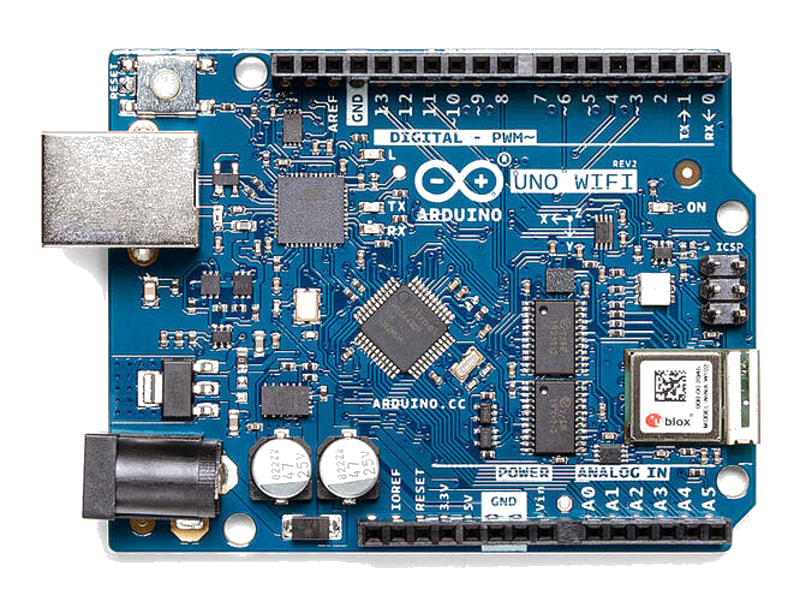
- Arduino Uno WiFi Rev2 — ATmega4809 + NINA-W102
- Arduino MKR WiFi 1010 — SAMD21 + NINA-W102
- Arduino Nano 33 IoT — SAMD21 + NINA-W102
The NINA module is controlled via SPI using the WiFiNINA library, which provides a familiar API similar to the older WiFi101 and Ethernet libraries. This enables connecting to Wi-Fi networks, making HTTP requests, creating web servers, and communicating over TCP/UDP.
For this interfacing you need the following components:
- Arduino Uno WiFi Rev2 / MKR WiFi 1010 / Nano 33 IoT
- USB cable to connect Arduino to your computer
- Wi-Fi network with known SSID and password
No external hardware is required — the Wi-Fi module is built into the board.
Schematic
No wiring is needed. The NINA-W102 module is connected to the main microcontroller internally via SPI. The following pins are used by the NINA module and should not be used for other purposes:
| Uno WiFi Rev2 Pin | Connected To |
|---|---|
| D7 (SPI CS) | NINA chip select |
| D6 (SPI IRQ) | NINA interrupt |
| D5 (SPI RST) | NINA reset |
| ICSP (SPI) | NINA SPI bus (shared) |
| Serial1 (D0/D1) | NINA serial (debug) |
Pin Map
Uno WiFi Rev2 — SPI pins used by NINA
| Pin | Function | Do Not Use For |
|---|---|---|
| ICSP-4 (MOSI) | SPI to NINA | General I/O |
| ICSP-1 (MISO) | SPI to NINA | General I/O |
| ICSP-3 (SCK) | SPI to NINA | General I/O |
| D7 | NINA CS | General I/O |
| D6 | NINA IRQ | General I/O / PWM |
| D5 | NINA RST | General I/O / PWM |
MKR WiFi 1010 / Nano 33 IoT
These boards use dedicated internal SPI pins that are not exposed on the headers.
Install necessary Library
Install the WiFiNINA library by Arduino via the Library Manager (Tools > Manage Libraries).
Alternatively, using arduino-cli:
arduino-cli lib install "WiFiNINA"
Some boards (Uno WiFi Rev2) also require the Arduino Uno WiFi Rev2 board package installed via Boards Manager.
Code with complete explanation
This sketch connects to a Wi-Fi network, prints the IP address, and makes an HTTP GET request to a test server. It also hosts a simple web server that responds with sensor data.
#include <WiFiNINA.h>

// Replace with your network credentials
const char *ssid     = "Your_SSID";
const char *password = "Your_Password";

// Server to connect to (example)
const char *host = "example.com";

int status = WL_IDLE_STATUS;

WiFiClient client;

void setup()
{
  Serial.begin(9600);

  // Check for the Wi-Fi module
  if (WiFi.status() == WL_NO_MODULE)
  {
    Serial.println("Wi-Fi module not detected!");
    while (true) {}
  }

  // Connect to Wi-Fi
  Serial.print("Connecting to ");
  Serial.print(ssid);

  while (status != WL_CONNECTED)
  {
    status = WiFi.begin(ssid, password);
    delay(10000);
  }

  Serial.println(" connected!");
  printWiFiStatus();
  Serial.println();
}

void loop()
{
  // --- HTTP GET request ---
  Serial.print("Connecting to ");
  Serial.print(host);

  if (client.connect(host, 80))
  {
    Serial.println(" connected");
    Serial.println("Sending request...");

    client.println("GET / HTTP/1.1");
    client.print("Host: ");
    client.println(host);
    client.println("Connection: close");
    client.println();

    // Read response
    unsigned long timeout = millis() + 5000;

    while (client.connected() && millis() < timeout)
    {
      while (client.available())
      {
        char c = client.read();
        Serial.write(c);
      }
    }

    client.stop();
    Serial.println("\nDisconnected");
  }
  else
  {
    Serial.println(" connection failed");
  }

  delay(10000);
}

// Print Wi-Fi status to Serial Monitor
void printWiFiStatus()
{
  Serial.print("SSID: ");
  Serial.println(WiFi.SSID());

  IPAddress ip = WiFi.localIP();
  Serial.print("IP address: ");
  Serial.println(ip);

  long rssi = WiFi.RSSI();
  Serial.print("Signal strength (RSSI): ");
  Serial.print(rssi);
  Serial.println(" dBm");
}
Web server example
To host a web server on the Arduino that responds to HTTP requests:
#include <WiFiNINA.h>

const char *ssid     = "Your_SSID";
const char *password = "Your_Password";

WiFiServer server(80);
int status = WL_IDLE_STATUS;

void setup()
{
  Serial.begin(9600);

  while (WiFi.begin(ssid, password) != WL_CONNECTED)
  {
    delay(10000);
  }

  server.begin();
  Serial.print("Server started at: ");
  Serial.println(WiFi.localIP());
}

void loop()
{
  WiFiClient client = server.available();

  if (client)
  {
    String request = "";

    while (client.connected())
    {
      if (client.available())
      {
        char c = client.read();
        request += c;

        if (request.endsWith("\r\n\r\n"))
        {
          break;
        }
      }
    }

    // Simple HTML response
    client.println("HTTP/1.1 200 OK");
    client.println("Content-Type: text/html");
    client.println("Connection: close");
    client.println();
    client.println("<!DOCTYPE HTML>");
    client.println("<html>");
    client.println("<h1>Arduino Web Server</h1>");
    client.println("<p>Analog A0: ");
    client.println(analogRead(A0));
    client.println("</p>");
    client.println("</html>");

    delay(10);
    client.stop();
  }
}
Code breakdown
#include <WiFiNINA.h>— includes the WiFiNINA library for NINA-based Wi-Fi boards.WiFi.status()— returns the current connection status.WL_NO_MODULEmeans the NINA module is not responding.WiFi.begin(ssid, password)— attempts to connect to the specified Wi-Fi network. ReturnsWL_CONNECTEDwhen successful.WiFi.localIP()— returns the Arduino’s IP address once connected.WiFi.RSSI()— returns the received signal strength in dBm.WiFi.SSID()— returns the SSID of the connected network.WiFiClient client— creates a TCP client for outbound connections.client.connect(host, port)— connects to a remote server. Returnstrueon success.client.println("GET / HTTP/1.1")— sends an HTTP GET request.client.available()— returns the number of bytes available to read from the server response.client.read()— reads one byte from the response.client.stop()— disconnects the TCP connection.WiFiServer server(80)— creates a TCP server on port 80.server.available()— returns aWiFiClientfor an incoming connection, or a false-y client if none pending.
Steps to perform this interfacing
- Connect the Arduino board (Uno WiFi Rev2, MKR WiFi 1010, or Nano 33 IoT) to your computer via USB.
- Install the WiFiNINA library via the Library Manager.
- If using an Uno WiFi Rev2, install the Arduino Uno WiFi Rev2 board package via Boards Manager.
- Replace
Your_SSIDandYour_Passwordin the code with your Wi-Fi network credentials. - Select the correct board and port (
Tools > BoardandTools > Port). - Upload the sketch to the Arduino.
- Open the Serial Monitor (
Tools > Serial Monitor, set baud rate to 9600). - Wait for the Arduino to connect to Wi-Fi — the Serial Monitor will print the IP address once connected.
- Observe the HTTP GET request to
example.comand the response printed in the Serial Monitor. - For the web server example, navigate to the Arduino’s IP address in a web browser.
Caution
- Board selection: The WiFiNINA library only works with boards that have an onboard NINA-W102 module (Uno WiFi Rev2, MKR WiFi 1010, Nano 33 IoT). It will NOT work with the older Arduino WiFi Shield (which uses the HDG204 module and the WiFi library) or with ESP8266/ESP32-based boards.
- Firmware update: The NINA-W102 module has its own firmware that must be compatible with the WiFiNINA library version. If you see
WL_NO_MODULEdespite correct wiring, update the NINA firmware using the FirmwareUpdater example included with WiFiNINA. Select the board, upload the updater sketch, then use Arduino IDE > Tools > WiFi101 / WiFiNINA Firmware Updater. - Power consumption: The NINA module draws approximately 200–400 mA during active Wi-Fi transmission (depending on TX power). This is within the board’s regulator capacity (3.3V @ 600–1000 mA) but will cause the main regulator to heat up. For battery-powered projects, use sleep modes and periodic wake-ups instead of continuous connection.
- SPI bus sharing: On the Uno WiFi Rev2, the NINA module shares the SPI bus with the ICSP header. If you connect SPI peripherals to the ICSP header, the NINA module may interfere. Use separate SPI devices with their own chip select pins and ensure only one CS is active at a time.
- SSL/TLS: The WiFiNINA library supports SSL connections via
WiFiSSLClientfor secure HTTPS connections. However, the NINA module has limited SSL memory — connecting to multiple SSL hosts or using SSL with large certificates may fail. - Wi-Fi range: The NINA module has a typical indoor range of 30–50 metres (similar to a smartphone). For longer range, use an external antenna (the MKR WiFi 1010 has a u.FL connector for an external antenna). The Uno WiFi Rev2 and Nano 33 IoT use a PCB antenna only.