Voice Recognition Module (V3 / Grove)
The Elechouse Voice Recognition Module V3 (and the Grove Speech Recognizer) is a speaker-dependent (user-trained) speech recognition module that can recognise up to 15 voice commands. It communicates over UART serial at 9600 baud (default). Commands are trained by speaking them while the module records the utterance into flash memory. Once trained, the module outputs a recognised command index over serial. It is an offline solution — no internet connection is required.
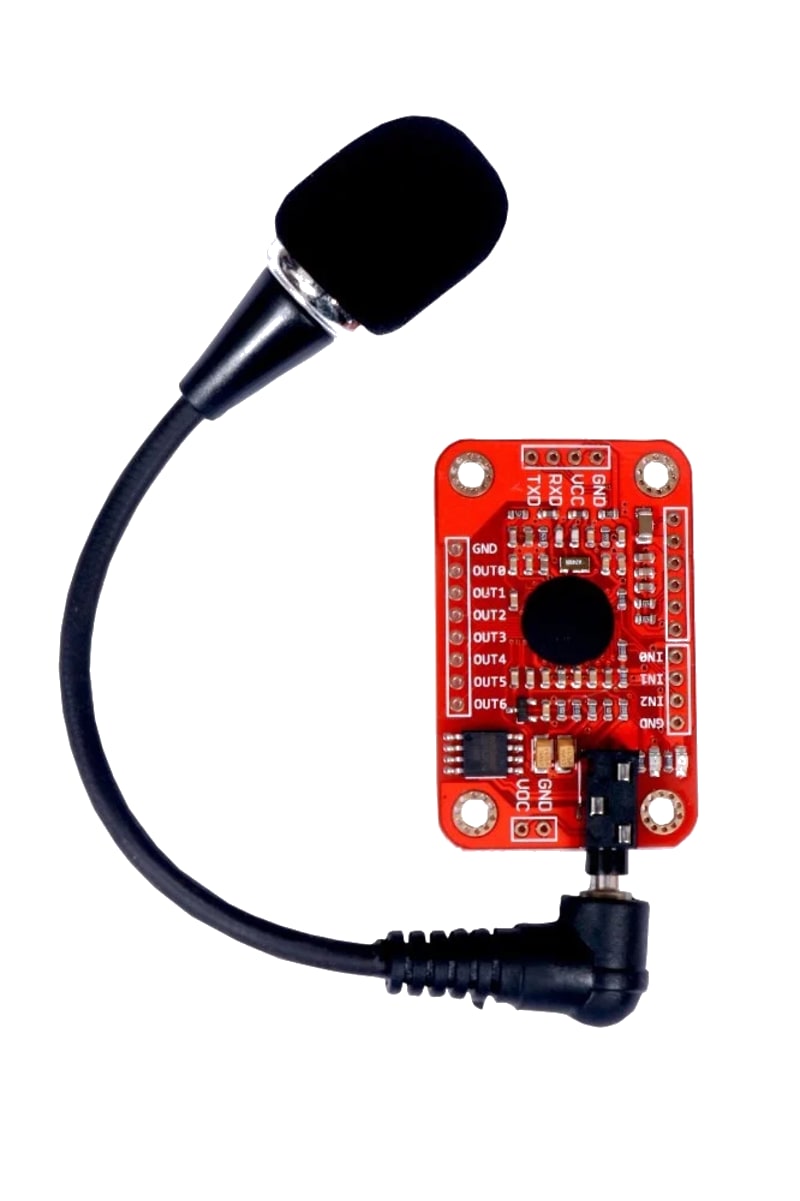
For this interfacing you need the following components:
- Arduino board (Uno, Nano, Mega, etc.)
- Elechouse Voice Recognition Module V3 (or Grove Speech Recognizer)
- Breadboard and jumper wires
- USB cable to connect Arduino to your computer
- (Optional) Microphone (electret mic module — some modules have onboard mic)
Schematic
VR Module V3          Arduino
-------------         -------
VCC           -->     5V
GND           -->     GND
TX            -->     Digital Pin 3 (Arduino RX via SoftwareSerial)
RX            -->     Digital Pin 2 (Arduino TX via SoftwareSerial)
The module operates at 5V and uses 3.3V logic on its UART — the 3.3V TX is safely read as HIGH by the Arduino’s 5V RX. The 5V TX from Arduino goes to the module’s 5V-tolerant RX.
On an Arduino Mega, use hardware serial (Serial1):
VR Module             Mega
---------             ----
TX             -->    Pin 19 (RX1)
RX             -->    Pin 18 (TX1)
Pin Map
| Module Pin | Name | Arduino Connection |
|---|---|---|
| VCC | Power | 5V |
| GND | Ground | GND |
| TX | Module Transmit | Pin 3 (SoftwareSerial RX) |
| RX | Module Receive | Pin 2 (SoftwareSerial TX) |
Install necessary Library
Install the VoiceRecognitionV3 library by Elechouse via the Library Manager (Tools > Manage Libraries).
Alternatively, using arduino-cli:
arduino-cli lib install "VoiceRecognitionV3"
Code with complete explanation
This sketch trains a single voice command (“Arduino” or any word) and then continuously listens for it, printing the result to the Serial Monitor.
#include <SoftwareSerial.h>
#include <VoiceRecognitionV3.h>

// SoftwareSerial for the VR module
VR myVR(2, 3);  // RX = pin 2, TX = pin 3

// Command record structure
// Each record has: command ID (1–255) and a 7-character description
uint8_t records[2];  // Store recognised command IDs
// #define Record (0)       // Train command
// #define Command1 (1)     // Recognised command ID

void setup()
{
  Serial.begin(9600);
  myVR.begin(9600);

  if (myVR.clear() == 0)
  {
    Serial.println("VR Module ready — memory cleared");
  }
  else
  {
    Serial.println("VR Module not responding");
    while (1) {}
  }

  // Train a single command with ID 1
  Serial.println("Say a word to train (e.g., 'Arduino')");
  Serial.println("You have 5 seconds...");

  // load(uint8_t id, uint8_t trainTimes, uint8_t *sRecog)
  // Train a command with ID 1, 1 training session
  uint8_t trainResult = myVR.load((uint8_t)1, (uint8_t)1, records);

  if (trainResult == 0)
  {
    Serial.println("Training successful!");
  }
  else
  {
    Serial.print("Training failed. Code: ");
    Serial.println(trainResult);
  }

  delay(1000);
}

void loop()
{
  // Listen for commands
  uint8_t buf[64];
  uint8_t len = myVR.recognise(buf, 64);

  if (len > 0)
  {
    uint8_t commandIndex = buf[1];  // ID of recognised command

    Serial.print("Recognised: Command #");
    Serial.println(commandIndex);

    // Handle the command
    if (commandIndex == 1)
    {
      Serial.println("Command 1 triggered!");
    }
  }

  delay(100);
}
Training multiple commands
void trainCommands()
{
  // Train 3 commands
  myVR.load((uint8_t)1, (uint8_t)1, records);  // "Arduino"
  delay(2000);
  myVR.load((uint8_t)2, (uint8_t)1, records);  // "LED on"
  delay(2000);
  myVR.load((uint8_t)3, (uint8_t)1, records);  // "LED off"
}

void loop()
{
  uint8_t buf[64];
  uint8_t len = myVR.recognise(buf, 64);

  if (len > 0)
  {
    switch (buf[1])
    {
      case 1:
        Serial.println("Arduino — turning LEDs on");
        break;
      case 2:
        Serial.println("LED on — lighting up");
        break;
      case 3:
        Serial.println("LED off — turning off");
        break;
    }
  }
}
Loading pre-trained commands from flash
// The library stores trained commands in the VR module's flash.
// To reload them after power cycle:
void restoreCommands()
{
  // Commands persist in flash — just call myVR.begin()
  // They are automatically available after power-up.
  // Use myVR.load() only for new training.
}
Code breakdown
VR myVR(rxPin, txPin)— creates a SoftwareSerial-based VR object. Pins 2 (RX) and 3 (TX) are used for the Uno.myVR.begin(9600)— initialises UART at 9600 baud.myVR.clear()— erases all trained commands from the module’s flash memory.myVR.load(id, trainTimes, records)— enters training mode. Speak the command within the timeout (≈ 5 s).idis 1–255.trainTimes= number of training sessions (1–7, higher = more accurate). Returns 0 on success.myVR.recognise(buf, size)— listens for a command and fillsbuf[1]with the recognised command ID. Returns 0 if nothing recognised. The module has a ≈ 3-second timeout — if no command is spoken, it returns.- The buffer format:
buf[0]= number of commands recognised,buf[1]= first command ID, etc.
Simplified polling without library (raw UART)
void loop()
{
  if (myVR.available())
  {
    String s = myVR.readString();
    Serial.println(s);  // Module outputs "ID=1" on match
  }
}
Steps to perform this interfacing
- Connect the VR module to the Arduino as shown.
- Install the VoiceRecognitionV3 library via the Library Manager.
- Copy the code into the Arduino IDE.
- Select the correct board and port (
Tools > BoardandTools > Port). - Upload the sketch to the Arduino.
- Open the Serial Monitor (
Tools > Serial Monitor, set baud rate to 9600). - When prompted, speak a single word clearly into the microphone.
- If training succeeds, wait and then repeat the word — the module should recognise it.
- To retrain, press the Arduino’s reset button and speak a different command.
Caution
- Speaker-dependent: The VR module must be trained by the same person who will use it. It matches the voice characteristics (tone, pitch) of the training utterance. If someone else speaks the same command, recognition will likely fail. For speaker-independent recognition, use a cloud-based service (Google Speech, Wit.ai) or a dedicated SI chip.
- Background noise: The module’s microphone picks up all nearby sounds. Fans, air conditioning, music, or other people talking will interfere with recognition. Speak loudly and clearly, within 10–30 cm of the microphone. For noisy environments, use a directional or noise-cancelling microphone module.
- Training environment matters: Train the command in the same environment where it will be used — if the module is to be used next to a running motor, train it with the motor running in the background. The module learns the noise profile and filters it better.
- Command duration: Each command must be 1–2 seconds long. Shorter utterances (a single syllable like “go”) may not be recognised reliably. Longer utterances (> 3 seconds) are truncated. Use 2-syllable words or short phrases: “turn on”, “light up”, “activate”.
- Limited vocabulary: The V3 module stores a maximum of 15 commands. If you need more, external command chaining (recognising a command, then listening for a second command) can expand the effective vocabulary, but adds latency.
- UART buffer overflow: At 9600 baud, the module sends short ID strings when commands are recognised. If your Arduino’s UART buffer overflows (serial data arriving while the main loop is blocked), you may miss commands. Keep
loop()responsive and use a buffer if needed. - Power consumption: The module draws approximately 20–30 mA during idle listening and 40–60 mA during processing (during and shortly after a command). It can be powered from the Arduino’s 5V pin.