DS1307/DS3231 RTC Sensor
The DS1307 and DS3231 are Real-Time Clock (RTC) modules that keep accurate time even when the Arduino is powered off, using a coin cell backup battery. The DS3231 is the superior choice with a temperature-compensated crystal oscillator (+/-2 ppm accuracy vs. DS1307’s +/-5 ppm). Both communicate over I2C and are functionally interchangeable in code.
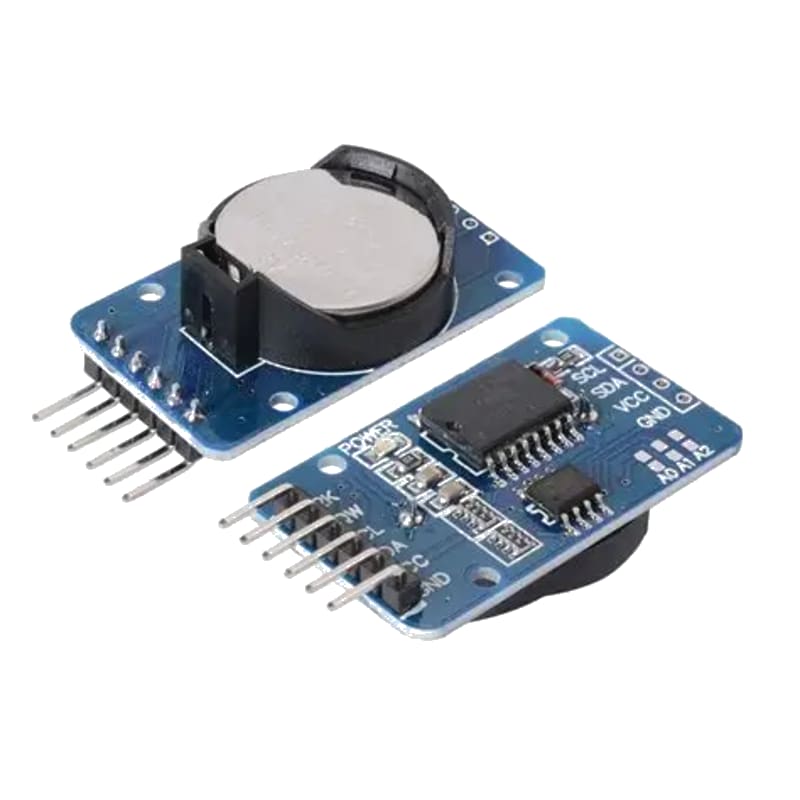
For this interfacing you need the following components:
- Arduino board (Uno, Nano, Mega, etc.)
- DS1307 or DS3231 RTC module (with CR2032 battery)
- Breadboard and jumper wires
- USB cable to connect Arduino to your computer
Schematic
The RTC module communicates over the I2C bus. Connect it to the Arduino as follows:
RTC Module            Arduino
----------            -------
VCC           -->     5V
GND           -->     GND
SCL           -->     A5 (Uno/Nano) or SCL (Mega/Due)
SDA           -->     A4 (Uno/Nano) or SDA (Mega/Due)
SQW           -->     (Optional) Any digital pin for interrupt
Most RTC modules include built-in pull-up resistors and a battery holder. Insert the CR2032 coin cell before use.
Pin Map
| Pin | Name | Connection |
|---|---|---|
| VCC | Power | 5V |
| GND | Ground | GND |
| SCL | I2C Clock | A5 (Uno/Nano), SCL (Mega) |
| SDA | I2C Data | A4 (Uno/Nano), SDA (Mega) |
| SQW | Square Wave / Alarm | Optional (interrupt-capable digital pin) |
I2C pins vary by Arduino board:
- Uno / Nano / Mini: SDA to A4, SCL to A5
- Mega 2560: SDA to 20, SCL to 21
- Leonardo: SDA to 2, SCL to 3
- Due / Zero: SDA to SDA, SCL to SCL
Install necessary Library
Install the RTClib by Adafruit via the Library Manager (Tools > Manage Libraries):
- RTClib by Adafruit
Alternatively, using arduino-cli:
arduino-cli lib install "RTClib"
Code with complete explanation
This sketch initializes the RTC, sets the date/time if it has lost power, and prints the current date and time to the Serial Monitor every second.
#include <RTClib.h>

RTC_DS3231 rtc; // Change to RTC_DS1307 if using DS1307

void setup()
{
  Serial.begin(9600);
  Serial.println("RTC Test");

  if (!rtc.begin())
  {
    Serial.println("Could not find RTC");
    while (1);
  }

  // Check if RTC lost power and time is invalid
  if (rtc.lostPower())
  {
    Serial.println("RTC lost power, setting time to compile time");

    // Set to the date/time this sketch was compiled
    rtc.adjust(DateTime(F(__DATE__), F(__TIME__)));
  }
}

void loop()
{
  DateTime now = rtc.now();

  Serial.print(now.year(), DEC);
  Serial.print('/');
  Serial.print(now.month(), DEC);
  Serial.print('/');
  Serial.print(now.day(), DEC);
  Serial.print("  ");
  Serial.print(now.hour(), DEC);
  Serial.print(':');
  Serial.print(now.minute(), DEC);
  Serial.print(':');
  Serial.print(now.second(), DEC);
  Serial.println();

  delay(1000);
}
Code breakdown
#include <RTClib.h>— includes the RTC library that supports both DS1307 and DS3231.RTC_DS3231 rtc— creates an RTC object. UseRTC_DS1307if you have the DS1307 module.rtc.begin()— initializes the I2C connection and returnstrueif the RTC is detected.rtc.lostPower()— returnstrueif the RTC has lost battery power and the time is invalid (useful for first-time setup).rtc.adjust(DateTime(...))— sets the RTC to a specific date and time.DateTime(F(__DATE__), F(__TIME__))— uses the sketch compilation date and time as the RTC time. Update the sketch periodically to keep it accurate.rtc.now()— returns aDateTimeobject with the current date and time.now.year(),now.month(),now.day(),now.hour(),now.minute(),now.second()— access individual time fields.
Setting a specific date/time
To set the RTC to a specific date and time instead of using the compile time:
rtc.adjust(DateTime(2026, 5, 30, 14, 30, 0)); // 2026-05-30 14:30:00
Reading temperature (DS3231 only)
The DS3231 has a built-in temperature sensor:
float temp = rtc.getTemperature();
Serial.print("Temperature: ");
Serial.print(temp);
Serial.println(" C");
Steps to perform this interfacing
- Insert the CR2032 battery into the RTC module.
- Connect the RTC module to the Arduino as shown in the schematic.
- Install the RTClib by Adafruit via the Library Manager.
- Copy the code into the Arduino IDE.
- Change
RTC_DS3231toRTC_DS1307if using a DS1307 module. - Select the correct board and port (
Tools > BoardandTools > Port). - Upload the sketch to the Arduino.
- Open the Serial Monitor (
Tools > Serial Monitor, set baud rate to 9600). - Observe the current date and time printed every second.
Caution
- The CR2032 backup battery maintains timekeeping when the main power is off. Without the battery, the RTC resets every time power is removed.
- The DS1307 does not have a built-in temperature sensor. Calling
getTemperature()on a DS1307 returns an error. - The DS1307 has an accuracy of about +/-5 ppm (roughly +/-1 minute per month). The DS3231 is significantly more accurate at +/-2 ppm (+/-1 minute per year) and is preferred for any application where drift matters.
- SQW (square wave) output on the DS3231 can be configured to output 1 Hz for precise timing without using an interrupt on the Arduino.
- When using the
__DATE__and__TIME__macros, the RTC is set to the time when the sketch was compiled, not when it is uploaded. If the upload happens later, the time will be slightly behind. - Avoid using the I2C address 0x68 for other devices — both DS1307 and DS3231 use this fixed address.