HC-SR04 Ultrasonic Distance Sensor
The HC-SR04 is an ultrasonic distance sensor that measures distance by emitting a 40 kHz sound pulse and timing how long it takes for the echo to return. It offers a range of 2 cm to 400 cm with millimeter-level resolution, making it ideal for obstacle avoidance, tank level monitoring, and proximity sensing.
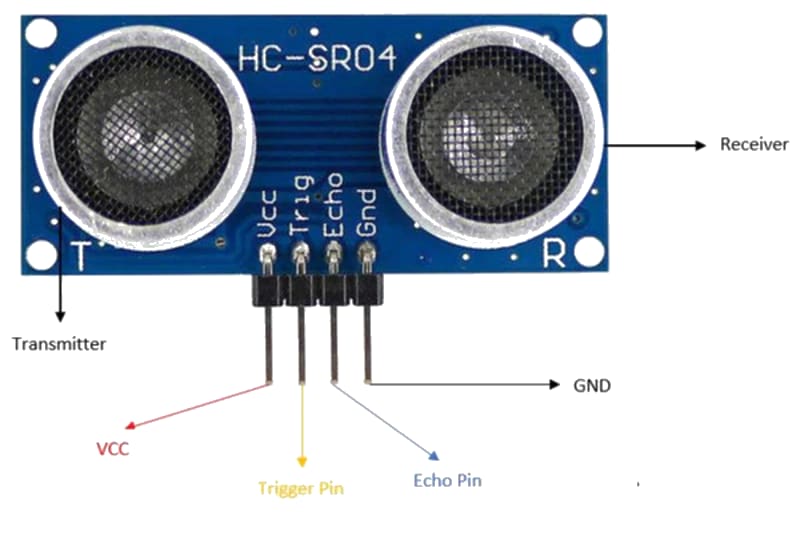
For this interfacing you need the following components:
- Arduino board (Uno, Nano, Mega, etc.)
- HC-SR04 ultrasonic distance sensor module
- Breadboard and jumper wires
- USB cable to connect Arduino to your computer
Schematic
Connect the HC-SR04 to the Arduino as follows:
HC-SR04               Arduino
-------               -------
VCC           -->     5V
Trig          -->     Digital Pin 9
Echo          -->     Digital Pin 10
GND           -->     GND
No external components are required. The HC-SR04 operates at 5V and its echo output is 5V-tolerant for Arduino inputs.
Pin Map
| Pin | Name | Connection |
|---|---|---|
| VCC | Power | 5V |
| Trig | Trigger (input) | Any digital pin (pin 9 used) |
| Echo | Echo (output) | Any digital pin (pin 10 used) |
| GND | Ground | GND |
Install necessary Library
No external library is required. The HC-SR04 uses pulseIn() and standard digital I/O functions built into Arduino.
For convenience, you may install the NewPing library by Tim Eckel via the Library Manager, which handles timing edge cases and supports multiple sensors. This tutorial uses the direct approach.
Code with complete explanation
This sketch measures distance using the HC-SR04 and prints the result in centimeters and inches to the Serial Monitor.
const int trigPin = 9;
const int echoPin = 10;

void setup()
{
  Serial.begin(9600);
  pinMode(trigPin, OUTPUT);
  pinMode(echoPin, INPUT);
}

void loop()
{
  // Send a 10-microsecond trigger pulse
  digitalWrite(trigPin, LOW);
  delayMicroseconds(2);
  digitalWrite(trigPin, HIGH);
  delayMicroseconds(10);
  digitalWrite(trigPin, LOW);

  // Measure echo pulse duration in microseconds
  long duration = pulseIn(echoPin, HIGH, 30000); // 30 ms timeout (~5 m)

  // Calculate distance
  float distanceCm = duration * 0.034 / 2;
  float distanceIn = duration * 0.0133 / 2;

  // Check for out-of-range
  if (distanceCm == 0)
  {
    Serial.println("Out of range");
  }
  else
  {
    Serial.print("Distance: ");
    Serial.print(distanceCm);
    Serial.print(" cm  ");
    Serial.print(distanceIn);
    Serial.println(" in");
  }

  delay(500);
}
Code breakdown
pinMode(trigPin, OUTPUT)— the trigger pin is driven by the Arduino to initiate a measurement.pinMode(echoPin, INPUT)— the echo pin is read by the Arduino to receive the returning pulse.digitalWrite(trigPin, LOW)thenHIGHfor 10 µs thenLOW— produces the 10 µs TTL pulse that tells the sensor to emit an ultrasonic burst.pulseIn(echoPin, HIGH, 30000)— waits for the echo pin to go HIGH, then times how long it stays HIGH. The third argument (30000 µs = 30 ms) sets a timeout that corresponds to roughly 5 meters.duration * 0.034 / 2— converts time to distance in centimeters. Sound travels at approximately 343 m/s (0.034 cm/µs). The division by 2 accounts for the round-trip (sound travels to the object and back).- If
durationis 0, the pulse timed out, meaning no object was detected within range.
Using the NewPing library
The NewPing library simplifies the code and improves reliability:
#include <NewPing.h>

const int trigPin = 9;
const int echoPin = 10;
const int maxDistance = 400; // cm

NewPing sonar(trigPin, echoPin, maxDistance);

void setup()
{
  Serial.begin(9600);
}

void loop()
{
  delay(500);

  unsigned int distanceCm = sonar.ping_cm();

  if (distanceCm == 0)
  {
    Serial.println("Out of range");
  }
  else
  {
    Serial.print("Distance: ");
    Serial.print(distanceCm);
    Serial.println(" cm");
  }
}
Steps to perform this interfacing
- Connect the HC-SR04 to the Arduino as shown in the schematic.
- Copy the code into the Arduino IDE.
- Select the correct board and port (
Tools > BoardandTools > Port). - Upload the sketch to the Arduino.
- Open the Serial Monitor (
Tools > Serial Monitor, set baud rate to 9600). - Place an object in front of the sensor at varying distances and observe the readings.
Caution
- The HC-SR04 has a minimum measurement distance of 2 cm. Objects closer than 2 cm may return inaccurate readings or no echo at all.
- The maximum reliable range is approximately 400 cm (4 meters) under ideal conditions. Factors like air temperature, humidity, and the object’s surface affect accuracy.
- Soft, curved, or sound-absorbing materials (fabric, foam, carpet) may not reflect the ultrasonic pulse well, reducing the effective range. Hard, flat surfaces give the best results.
- The sensor beam has a cone angle of approximately 15-30 degrees. Objects outside this cone will not be detected, and objects near the edge may give inconsistent readings.
- Multiple HC-SR04 sensors operating simultaneously can interfere with each other. Use the NewPing library with staggered timing or different trigger patterns to avoid cross-talk.
- The Echo pin outputs 5V, which is safe for 5V Arduino inputs. For 3.3V boards (Due, Zero), use a voltage divider to step down the echo signal to 3.3V.
- Air temperature affects the speed of sound (approximately 0.6 m/s per degree Celsius). For precise outdoor measurements, compensate using a temperature sensor:
float speedOfSound = 331.3 + (0.606 * temperature);