NEO-6M / NEO-7M / NEO-8M GPS Module
The u-blox NEO-6M (and its successors NEO-7M, NEO-8M, NEO-M8) are 50-channel GPS receivers that output NMEA 0183 sentences over UART serial at 9600 baud (default). They provide position (latitude, longitude), altitude, speed over ground, course over ground, date, and time. The module includes an EEPROM-backed battery for hot-start (20-second fix) and a ceramic patch antenna.
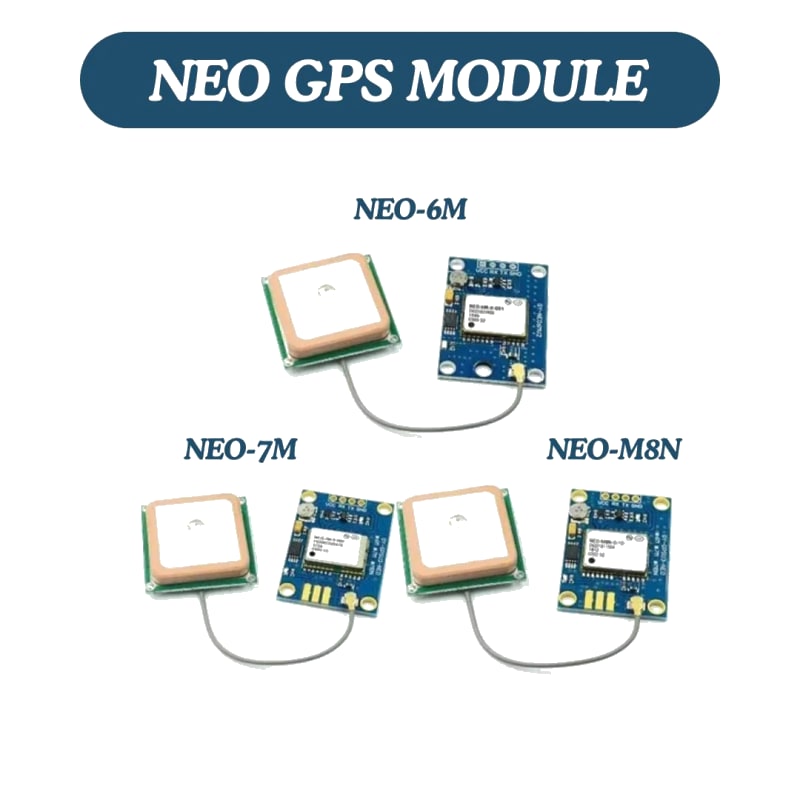
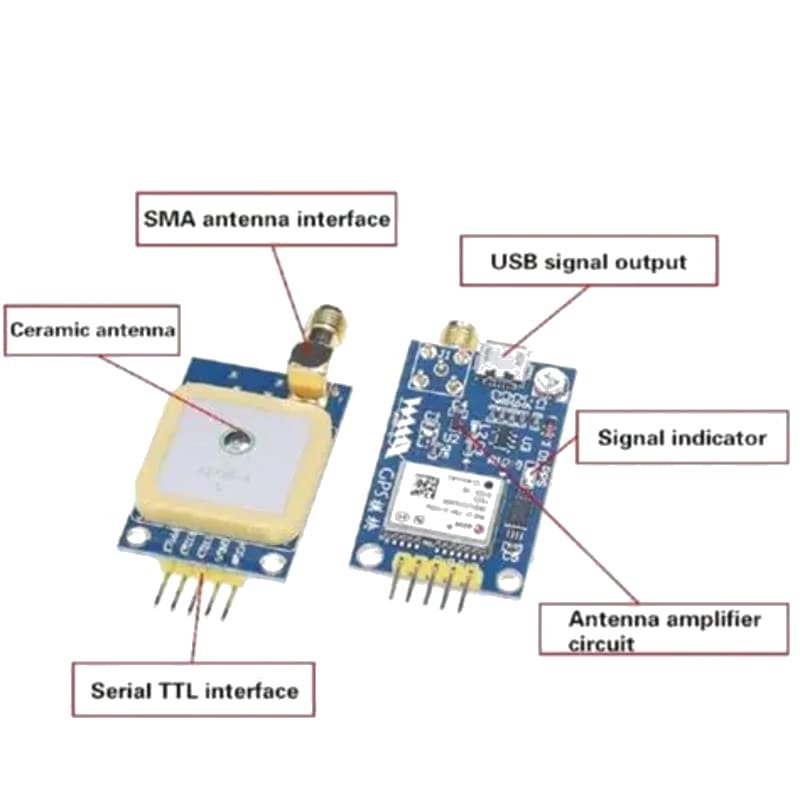
For this interfacing you need the following components:
- Arduino board (Uno, Nano, Mega, etc.)
- NEO-6M / NEO-7M / NEO-8M GPS module (with external or ceramic patch antenna)
- Breadboard and jumper wires
- USB cable to connect Arduino to your computer
- (Optional) External GPS antenna (if the module uses an SMA connector)
Schematic
GPS Module            Arduino
-----------           -------
VCC           -->     5V (or 3.3V — check module)
GND           -->     GND
TX            -->     Digital Pin 3 (Arduino RX via SoftwareSerial)
RX            -->     Digital Pin 2 (Arduino TX — optional, not needed for receive-only)
On an Arduino Mega, use Serial1 (pins 19 RX1, 18 TX1):
GPS TX        -->     Mega Pin 19 (RX1)
GPS RX        -->     Mega Pin 18 (TX1)
The GPS module sends NMEA data at 9600 baud. The RX pin only needs to be connected if you want to send configuration commands to the GPS module (e.g., to change baud rate or update rate).
Pin Map
| Module Pin | Name | Arduino Connection |
|---|---|---|
| VCC | Power | 5V or 3.3V (check module specs) |
| GND | Ground | GND |
| TX | GPS Transmit (NMEA out) | Pin 3 (SoftwareSerial RX) |
| RX | GPS Receive (commands) | Pin 2 (optional) |
Install necessary Library
Install the TinyGPSPlus library by Mikal Hart via the Library Manager.
arduino-cli lib install "TinyGPSPlus"
This library parses NMEA sentences (GGA, RMC, GSA, GSV, etc.) into typed fields. It is header-only and has no dependencies.
Code with complete explanation
This sketch reads GPS data and displays position, speed, altitude, date, and time to the Serial Monitor.
#include <SoftwareSerial.h>
#include <TinyGPSPlus.h>

TinyGPSPlus gps;

// SoftwareSerial for GPS
// GPS TX → Arduino Pin 3
SoftwareSerial gpsSerial(3, 2);  // RX = pin 3, TX = pin 2

void setup()
{
  Serial.begin(9600);
  gpsSerial.begin(9600);

  Serial.println("GPS Receiver Test");
  Serial.println("Waiting for satellite fix...");
  Serial.println();
}

void loop()
{
  // Feed data to the parser
  while (gpsSerial.available())
  {
    char c = gpsSerial.read();
    gps.encode(c);
  }

  // Print data every second
  static unsigned long lastPrint = 0;

  if (millis() - lastPrint >= 1000)
  {
    lastPrint = millis();

    if (gps.location.isValid())
    {
      Serial.print("Latitude: ");
      Serial.print(gps.location.lat(), 6);
      Serial.print("  Longitude: ");
      Serial.println(gps.location.lng(), 6);

      Serial.print("Altitude: ");
      Serial.print(gps.altitude.meters(), 1);
      Serial.println(" m");

      Serial.print("Speed: ");
      Serial.print(gps.speed.kmph(), 1);
      Serial.println(" km/h");

      Serial.print("Course: ");
      Serial.print(gps.course.deg(), 1);
      Serial.println("°");

      Serial.print("Date: ");
      Serial.print(gps.date.year());
      Serial.print("-");
      Serial.print(gps.date.month());
      Serial.print("-");
      Serial.print(gps.date.day());

      Serial.print("  Time: ");
      Serial.print(gps.time.hour());
      Serial.print(":");
      Serial.print(gps.time.minute());
      Serial.print(":");
      Serial.println(gps.time.second());

      Serial.print("Satellites: ");
      Serial.println(gps.satellites.value());

      Serial.print("HDOP: ");
      Serial.println(gps.hdop.hdop(), 1);
    }
    else
    {
      Serial.println("No fix yet. Ensure antenna has sky view.");
    }

    Serial.println();
  }
}
Getting distance and bearing to a waypoint
// Target coordinates (e.g., home position)
const double HOME_LAT = 51.5074;
const double HOME_LNG = -0.1278;

void loop()
{
  // ... feed gps.encode() ...

  if (gps.location.isValid())
  {
    double distanceKm =
      TinyGPSPlus::distanceBetween(
        gps.location.lat(),
        gps.location.lng(),
        HOME_LAT,
        HOME_LNG
      );

    double bearing =
      TinyGPSPlus::courseTo(
        gps.location.lat(),
        gps.location.lng(),
        HOME_LAT,
        HOME_LNG
      );

    Serial.print("Distance to home: ");
    Serial.print(distanceKm, 3);
    Serial.println(" km");

    Serial.print("Bearing to home: ");
    Serial.print(bearing, 1);
    Serial.println("°");
  }
}
Code breakdown
gps.encode(c)— feeds one character at a time from the GPS module into the TinyGPS++ parser. Parse the serial buffer in a tight loop. Call this as frequently as possible (every byte received).gps.location.isValid()— returnstruewhen a valid 3D fix has been obtained and the location data is current (age < 1000 ms).gps.location.lat()/.lng()— latitude and longitude in signed decimal degrees (South/West are negative).gps.altitude.meters()— altitude above mean sea level (WGS84 geoid), ±10–20 m accuracy.gps.speed.kmph()— speed over ground in km/h.gps.course.deg()— course over ground (COG) in degrees (0–359, relative to true north).gps.date/gps.time— UTC date and time from the GPS. Time is UTC, not local time.gps.satellites.value()— number of satellites used in the fix (3D fix requires ≥ 4).gps.hdop.hdop()— horizontal dilution of precision. Lower = better. < 2 = excellent, > 6 = poor.TinyGPSPlus::distanceBetween(lat1, lng1, lat2, lng2)— static method returning the great-circle distance in km between two coordinates (Haversine formula).TinyGPSPlus::courseTo(lat1, lng1, lat2, lng2)— initial bearing in degrees from point 1 to point 2.
Configuring the GPS module (baud rate, update rate)
void setup()
{
  gpsSerial.begin(9600);

  // Send UBX command to set update rate to 10 Hz
  // (Default is 1 Hz). NEO-6M max is 5 Hz.
  uint8_t setRate[] = {
    0xB5, 0x62,           // UBX sync chars
    0x06, 0x08,           // CFG-RATE message
    0x06, 0x00,           // Length = 6
    0xE8, 0x03,           // measRate = 1000 ms (1 Hz)
    0x01, 0x00,           // navRate = 1
    0x01, 0x00,           // timeRef = UTC
    0x01, 0x00            // CK_A, CK_B (checksum)
  };

  gpsSerial.write(setRate, sizeof(setRate));
}
Calculate the checksum using the u-blox Checksum Calculator or a library like u-blox GNSS (by u-blox).
Steps to perform this interfacing
- Connect the GPS module to the Arduino as shown.
- Install the TinyGPSPlus library via the Library Manager.
- Place the GPS antenna near a window with a clear view of the sky (or go outdoors).
- Copy the code into the Arduino IDE.
- Select the correct board and port (
Tools > BoardandTools > Port). - Upload the sketch to the Arduino.
- Open the Serial Monitor (
Tools > Serial Monitor, set baud rate to 9600). - The GPS receiver flashes an LED (if present) at 1 Hz while searching for a fix.
- Once the fix LED is solid (or blinking at different rate), location data starts printing.
- Walk outside with the Arduino + GPS — observe speed and course updating.
Fix time expectations
| Condition | Cold start (no almanac) | Hot start (recent almanac) |
|---|---|---|
| Open sky | 30–60 seconds | 1–5 seconds |
| Near window | 1–5 minutes | 5–30 seconds |
| Indoors (no sky view) | Will not fix | Will not fix |
Caution
- Antenna must have sky view: GPS signals are extremely weak (–127 dBm). They do not penetrate concrete roofs, metal enclosures, or dense foliage. For indoor operation, an external antenna placed directly against a window (facing south in the northern hemisphere) with unobstructed sky is the minimum requirement. Wood and glass attenuate signals by 3–6 dB — enough to reduce the fix time but still achievable. Brick walls reduce signals by 10–20 dB and typically prevent a fix.
- First fix time (TTFF): The NEO-6M takes 30–60 seconds for a cold start (no stored ephemeris data) under open sky. If the backup battery is dead or missing, every start is a cold start. A warm start (stored ephemeris < 4 hours old) takes ≈ 5–10 seconds. A hot start (ephemeris < 2 hours old + time/position known) takes ≈ 1–2 seconds.
- Backup battery: Most NEO-6M modules include a rechargeable CR2032 or coin cell holder. The battery maintains the RTC and SRAM for hot/warm starts. Without a battery, the module performs a cold start every power-up. The battery charges automatically from the module’s VCC when power is applied — it takes ≈ 12–24 hours to fully charge a depleted CR2032.
- Serial baud rate: The default baud rate is 9600. For 5 Hz or 10 Hz update rates, increase the baud rate to 57600 or 115200 to avoid serial buffer overflow (NMEA sentences are ≈ 80 bytes each × 5 Hz = 400 bytes/s, within 9600 baud’s ≈ 960 bytes/s capacity; at 10 Hz it becomes marginal). Change via UBX protocol or use the u-blox u-center software on a PC.
- SoftwareSerial limitations: At 9600 baud,
SoftwareSerialworks reliably on pins 2 and 3. At 57600 baud, SoftwareSerial may drop characters on the Uno. For higher baud rates, use a Mega with Serial1 or a board with multiple hardware UARTs. The GPS data is ASCII, so occasional character loss causes TinyGPS++ to miss NMEA sentences but recovers on the next valid sentence. - NMEA sentence selection: The NEO-6M outputs GGA, GSA, GSV, GLL, RMC, VTG, and ZDA by default. TinyGPS++ parses GGA, RMC, GSA, and VTG. If you need only position (lat/lon) and time, the minimal set is GGA + RMC. Configuring the module to output only these sentences reduces serial bandwidth. Use u-center or UBX commands to customise output.
- Interference: Active USB cables (some have ferrite beads), nearby radio transmitters (Wi-Fi at high power, GSM/cellular), and switching power supplies can interfere with GPS reception. Keep the GPS antenna at least 15 cm away from the Arduino board, Wi-Fi antennas, and the USB cable. A ground plane under the ceramic patch antenna improves reception — attach the module to a metal plate or use the copper on a PCB.
- Altitude accuracy: GPS altitude is less accurate than horizontal position (typically ±10–20 m vs ±2.5 m for position). This is due to satellite geometry (satellites are only overhead, not below). Do not rely on GPS altitude for precision applications — use a barometric altimeter (BMP280) fused with GPS.
- NMEA vs UBX: The NEO-6M supports both NMEA (text, slower) and u-blox’s binary UBX protocol (binary, faster). UBX can achieve higher update rates and provides raw measurements. The TinyGPS++ library only parses NMEA. For UBX, use the u-blox GNSS library by u-blox.