APDS-9960 Gesture Sensor
The APDS-9960 is a multi-function digital sensor from Broadcom/Avago that integrates gesture detection, proximity sensing, ambient light measurement, and colour (RGBC) sensing in a single I²C package. The gesture engine uses four directional photodiodes with an IR LED to detect hand swipes (up, down, left, right) at distances up to 20 cm. It also provides proximity data and ambient light levels, making it suitable for touchless user interfaces, presence detection, and automatic display brightness control.
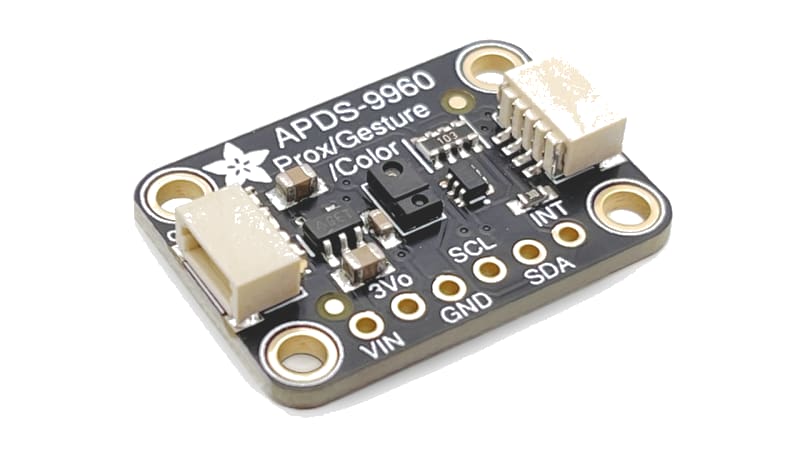
For this interfacing you need the following components:
- Arduino board (Uno, Nano, Mega, etc.)
- APDS-9960 gesture sensor module (e.g., Adafruit APDS9960 breakout or Grove module)
- Breadboard and jumper wires
- USB cable to connect Arduino to your computer
Schematic
The APDS-9960 communicates over I²C. Connect it to the Arduino as follows:
APDS-9960 Module      Arduino
---------------       -------
VCC           -->     3.3V (or 5V with onboard regulator)
GND           -->     GND
SCL           -->     A5 (Uno/Nano) or SCL (Mega)
SDA           -->     A4 (Uno/Nano) or SDA (Mega)
INT           -->     Digital Pin 2 (optional — interrupt)
LED           -->     Digital Pin 3 (optional — IR LED drive)
The module operates at 3.3V logic but many breakouts include a voltage regulator and accept 5V on VCC. The INT pin is optional — the sensor can be polled without it.
Pin Map
| Module Pin | Name | Arduino Connection |
|---|---|---|
| VCC | Power | 3.3V or 5V (check module) |
| GND | Ground | GND |
| SCL | I²C Clock | A5 (Uno/Nano), SCL (Mega) |
| SDA | I²C Data | A4 (Uno/Nano), SDA (Mega) |
| INT | Interrupt (active LOW) | Pin 2 (optional) |
| LED | IR LED anode | Pin 3 via resistor (optional) |
I²C pins vary by Arduino board:
- Uno / Nano / Mini: SDA → A4, SCL → A5
- Mega 2560: SDA → 20, SCL → 21
- Leonardo: SDA → 2, SCL → 3
I²C address
The APDS-9960 has a fixed I²C address of 0x39.
Install necessary Library
Install the Adafruit APDS9960 library by Adafruit via the Library Manager (Tools > Manage Libraries).
Alternatively, using arduino-cli:
arduino-cli lib install "Adafruit APDS9960 Library"
The library depends on the Adafruit BusIO and Wire libraries.
Code with complete explanation
This sketch detects hand gestures (up, down, left, right) and proximity readings using the APDS-9960, printing the results to the Serial Monitor.
#include <Wire.h>
#include <Adafruit_APDS9960.h>

Adafruit_APDS9960 apds;

void setup()
{
  Serial.begin(9600);

  if (!apds.begin())
  {
    Serial.println("APDS-9960 not found. Check wiring.");
    while (1) {}
  }

  Serial.println("APDS-9960 Gesture Sensor Test");

  // Enable gesture sensing
  apds.enableGesture(true);
  apds.enableProximity(true);

  // Optional: adjust gesture parameters
  // apds.setGestureGain(GAIN_2X);      // Gain: 1X, 2X, 4X (default)
  // apds.setGestureLEDDrive(LED_DRIVE_100MA); // LED current: 100 mA (max)

  Serial.println("Swipe your hand over the sensor (2–20 cm above)");
  Serial.println();
}

void loop()
{
  // --- Gesture detection ---
  if (apds.gestureAvailable())
  {
    uint8_t gesture = apds.readGesture();

    Serial.print("Gesture: ");

    switch (gesture)
    {
      case APDS9960_UP:
        Serial.println("UP");
        break;

      case APDS9960_DOWN:
        Serial.println("DOWN");
        break;

      case APDS9960_LEFT:
        Serial.println("LEFT");
        break;

      case APDS9960_RIGHT:
        Serial.println("RIGHT");
        break;

      default:
        Serial.println("UNKNOWN");
        break;
    }
  }

  // --- Proximity (optional) ---
  uint8_t proximity = apds.readProximity();

  if (proximity > 0 && proximity < 255)
  {
    // Lower values = closer object
    Serial.print("Proximity: ");
    Serial.println(proximity);
  }

  delay(50); // Small delay to avoid flooding serial output
}
Code breakdown
#include <Adafruit_APDS9960.h>— includes the Adafruit APDS9960 library.apds.begin()— initialises the I²C connection and configures the sensor. Returnsfalseif no APDS-9960 is detected at address 0x39.apds.enableGesture(true)— enables the gesture detection engine. When disabled, the sensor consumes less power.apds.enableProximity(true)— enables the proximity sensor. Proximity data is used internally by the gesture engine and can also be read directly.apds.gestureAvailable()— returnstruewhen a complete gesture has been detected and is ready to read.apds.readGesture()— returns the detected gesture:APDS9960_UP,APDS9960_DOWN,APDS9960_LEFT,APDS9960_RIGHT, orAPDS9960_NONE.apds.readProximity()— returns the proximity value (0–255). Lower values indicate a closer object.
Gesture parameter configuration
// Set gesture gain (sensitivity)
apds.setGestureGain(GAIN_1X);   // Default: GAIN_4X
// Options: GAIN_1X, GAIN_2X, GAIN_4X

// Set LED drive current
apds.setGestureLEDDrive(LED_DRIVE_100MA);
// Options: LED_DRIVE_100MA, LED_DRIVE_50MA, LED_DRIVE_25MA, LED_DRIVE_12_5MA

// Set gesture proximity threshold
apds.setGestureProximityThreshold(PROX_THRESH_50);
// Options: PROX_THRESH_0 to PROX_THRESH_255

// Set gesture detection offset per direction
apds.setGestureUP_ENTER_THRESHOLD(40);
apds.setGestureUP_EXIT_THRESHOLD(20);
Ambient light and colour readings
The APDS-9960 also provides ambient light and colour (RGBC) measurements:
void readLightColor()
{
  uint16_t r, g, b, c;

  if (apds.colorDataReady())
  {
    apds.getColorData(&r, &g, &b, &c);

    float lux = apds.calculateLux(r, g, b, c);

    Serial.print("RGBC: ");
    Serial.print(r); Serial.print(" ");
    Serial.print(g); Serial.print(" ");
    Serial.print(b); Serial.print(" ");
    Serial.print(c);
    Serial.print("  Lux: ");
    Serial.println(lux, 1);
  }
}
Using the interrupt pin
For interrupt-driven gesture detection instead of polling:
const int intPin = 2;
volatile bool gestureFlag = false;

void setup()
{
  pinMode(intPin, INPUT_PULLUP);
  attachInterrupt(digitalPinToInterrupt(intPin), onGesture, FALLING);

  apds.enableGesture(true);
  apds.clearInterrupt();
}

void loop()
{
  if (gestureFlag)
  {
    gestureFlag = false;

    if (apds.gestureAvailable())
    {
      uint8_t gesture = apds.readGesture();
      // Handle gesture
    }

    apds.clearInterrupt();
  }
}

void onGesture()
{
  gestureFlag = true;
}
Steps to perform this interfacing
- Connect the APDS-9960 module to the Arduino as shown in the schematic.
- Install the Adafruit APDS9960 library via the Library Manager.
- Copy the code into the Arduino IDE.
- Select the correct board and port (
Tools > BoardandTools > Port). - Upload the sketch to the Arduino.
- Open the Serial Monitor (
Tools > Serial Monitor, set baud rate to 9600). - Hold your hand 5–15 cm above the sensor and swipe left, right, up, or down.
- Observe the detected gesture printed in the Serial Monitor.
- Move your hand closer and farther to see the proximity value change (lower = closer).
Tips for reliable gesture detection
- The sensor works best with a light-coloured hand in moderate ambient light.
- Swipe speed should be moderate — too slow or too fast may not be detected.
- The distance should be 5–15 cm above the sensor window.
- Dark-coloured objects absorb IR light and are harder to detect than light-coloured ones.
- Ambient IR interference (sunlight, incandescent lamps) can reduce sensitivity.
Caution
- Gesture sensing range: The APDS-9960 reliably detects gestures at 5–15 cm above the sensor. Beyond 20 cm, detection becomes unreliable. The range depends on ambient IR light, hand colour, and the IR LED drive current setting.
- IR LED current: The internal IR LED can be driven at up to 100 mA. At maximum current, the total module draw is approximately 100–120 mA during gesture detection. This is within the Arduino 3.3V regulator’s capacity but may contribute to heating if continuous. Set a lower LED drive current (
setGestureLEDDrive(LED_DRIVE_50MA)) to reduce power consumption at the cost of range. - Ambient IR interference: Bright sunlight and incandescent lighting contain significant IR that can swamp the sensor’s photodiodes, reducing gesture range. Fluorescent and LED lighting have minimal IR and cause less interference. If the sensor reports false gestures in bright light, shield the sensor from direct sunlight or increase the LED drive current.
- Gesture direction: The sensor detects relative direction (a hand moving across the sensor’s field of view), not absolute position. The UP/DOWN direction is along the long axis of the sensor package (typically aligned with the IC’s pin 1 marking). Rotating the sensor rotates the detected directions accordingly.
- Consecutive gestures: The sensor has a built-in debounce that prevents multiple rapid triggers. After detecting one gesture, it ignores further gestures for approximately 500 ms. This can be reduced by clearing the interrupt and re-enabling the gesture engine sooner, but doing so may cause false triggers from hand bounce.
- Proximity vs gesture: Proximity sensing should be enabled for gesture detection to work (the gesture engine uses proximity data to determine when a hand is present). However, reading
proximityin between gestures adds a slight delay — for gesture-only applications, you can disable proximity reading and rely on the gesture engine’s internal proximity trigger. - Colour sensor calibration: The colour (RGBC) readings from the APDS-9960 are uncalibrated raw counts. The
calculateLux()function provides a reasonable lux estimate, but for accurate lux measurements, a dedicated ambient light sensor (e.g., BH1750 or TSL2591) is preferred.