433 MHz Transmitter/Receiver Module
The 433 MHz ASK (Amplitude Shift Keying) transmitter and receiver pair is one of the lowest-cost wireless links available. The transmitter (FS1000A) sends digital data by modulating a 433 MHz carrier, and the receiver (XY-MK-5V or similar) demodulates it back to a digital signal. With a simple library like RCSwitch, you can transmit sensor readings, button states, and commands over distances of 50–200 metres (open air). These modules are widely used for remote outlets, weather stations, garage door openers, and garden sensor networks.
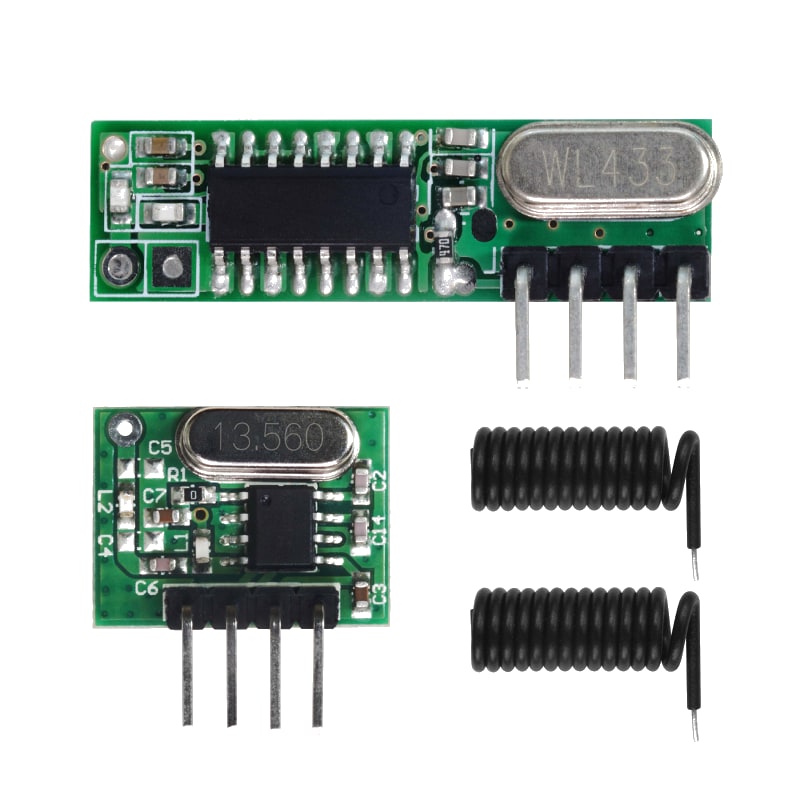
For this interfacing you need the following components:
- Arduino board × 2 (Uno, Nano, Mega, etc.)
- 433 MHz RF transmitter (FS1000A or equivalent)
- 433 MHz RF receiver (XY-MK-5V or equivalent)
- 17 cm length of wire (¼-wave antenna for each module)
- Breadboard and jumper wires
- USB cables to connect both Arduinos to your computer
Schematic
Transmitter connections
Transmitter (FS1000A)       Arduino
---------------------       -------
DATA                -->     Digital Pin 10
VCC                 -->     5V
GND                 -->     GND
ANT                 -->     17.3 cm wire (¼-wave monopole)
Receiver connections
Receiver (XY-MK-5V)         Arduino
-------------------         -------
DATA                -->     Digital Pin 11
VCC                 -->     5V
GND                 -->     GND
ANT                 -->     17.3 cm wire (¼-wave monopole)
These modules use a simple serial data protocol — not SPI. Any digital pin can be used for DATA. Using separate pins on the two Arduinos helps avoid confusion during programming.
Pin Map
| Module Pin | Name | Transmitter Arduino | Receiver Arduino |
|---|---|---|---|
| DATA | Data input/output | Pin 10 | Pin 11 |
| VCC | Power (5V) | 5V | 5V |
| GND | Ground | GND | GND |
| ANT | Antenna (solder pad) | 17.3 cm wire | 17.3 cm wire |
A ¼-wave monopole antenna for 433 MHz is calculated as: 300 / 433 / 4 × 100 = 17.3 cm. A straight wire of this length soldered to the ANT pad significantly improves range.
Install necessary Library
Install the RCSwitch library by sui77 via the Library Manager (Tools > Manage Libraries).
Alternatively, using arduino-cli:
arduino-cli lib install "RCSwitch"
The RCSwitch library handles pulse-width measurement, Manchester encoding/decoding, and protocol detection (supports many common 433 MHz protocols including those used by remote power outlets).
Code with complete explanation
This pair of sketches transmits a counter and a temperature value from one Arduino to another over 433 MHz.
Transmitter sketch (upload to first Arduino)
#include <RCSwitch.h>

RCSwitch transmitter = RCSwitch();

void setup()
{
  Serial.begin(9600);
  transmitter.enableTransmit(10); // Data pin connected to pin 10

  // Optional: set protocol and pulse length
  // transmitter.setProtocol(1);       // Default protocol
  // transmitter.setPulseLength(350);  // Default pulse length in µs

  // Optional: set repeat count (default 10)
  transmitter.setRepeatTransmit(5);

  Serial.println("433 MHz Transmitter Ready");
}

void loop()
{
  static uint32_t counter = 0;
  counter++;

  float temperature = 21.0 + (counter % 30) / 10.0;

  // Transmit as a formatted string
  char payload[32];
  snprintf(payload, sizeof(payload), "T:%u C:%.1f", counter, temperature);

  transmitter.send(payload, strlen(payload));

  Serial.print("Sent: ");
  Serial.println(payload);

  // Alternatively, send individual values as raw codes
  // transmitter.send(counter, 24); // Send 24-bit value

  delay(2000);
}
Receiver sketch (upload to second Arduino)
#include <RCSwitch.h>

RCSwitch receiver = RCSwitch();

void setup()
{
  Serial.begin(9600);
  receiver.enableReceive(11); // Data pin connected to pin 11

  Serial.println("433 MHz Receiver Ready");
}

void loop()
{
  if (receiver.available())
  {
    // Get the received value
    unsigned long value = receiver.getReceivedValue();

    if (value == 0)
    {
      Serial.print("Unknown encoding: ");
      Serial.print("Bit length: ");
      Serial.print(receiver.getReceivedBitlength());
      Serial.print("  Protocol: ");
      Serial.println(receiver.getReceivedProtocol());
    }
    else
    {
      Serial.print("Received raw: ");
      Serial.print(value);
      Serial.print("  Bit length: ");
      Serial.print(receiver.getReceivedBitlength());
      Serial.print("  Protocol: ");
      Serial.print(receiver.getReceivedProtocol());
      Serial.print("  Delay: ");
      Serial.print(receiver.getReceivedDelay());
      Serial.println(" us");
    }

    // Reset for next receive
    receiver.resetAvailable();
  }
}
Code breakdown
#include <RCSwitch.h>— includes the RCSwitch library for 433 MHz OOK communication.transmitter.enableTransmit(pin)— configures the specified pin as the transmitter data output.receiver.enableReceive(pin)— configures the specified pin as the receiver data input (using interrupts).transmitter.send(data, length)— sends a character array (string) with automatic Manchester encoding.transmitter.send(value, bitLength)— sends an integer value with the specified bit length (e.g., 24 bits).transmitter.setRepeatTransmit(n)— sets how many times each transmission is repeated (default 10). Fewer repeats = faster but less reliable.transmitter.setProtocol(protocol)— selects a protocol (1–6 default, plus custom). Protocol 1 is the most common.transmitter.setPulseLength(us)— sets the pulse length in microseconds (default 350 µs). Longer pulses increase range but reduce speed.receiver.available()— returnstruewhen a valid transmission has been received and decoded.receiver.getReceivedValue()— returns the decoded value as an unsigned long.receiver.getReceivedBitlength()— returns the number of bits in the received value.receiver.getReceivedProtocol()— returns the protocol number detected.receiver.getReceivedDelay()— returns the measured pulse length in microseconds.receiver.resetAvailable()— clears the received data and prepares for the next packet.
Sending structured data
For more complex payloads, encode multiple values into a single number:
// Transmitter: pack two 8-bit values into one 24-bit code
uint8_t sensorId = 1;
uint8_t value    = 127;
uint32_t code    = (sensorId << 16) | (value << 8) | checksum;

transmitter.send(code, 24);
// Receiver: unpack
uint32_t code     = receiver.getReceivedValue();
uint8_t sensorId  = (code >> 16) & 0xFF;
uint8_t value     = (code >> 8) & 0xFF;
uint8_t checksum  = code & 0xFF;
Using the RH_ASK library (alternative)
The RadioHead ASK library provides a packet-based interface:
#include <RH_ASK.h>
#include <SPI.h>

RH_ASK driver(2000, 11, 10); // (speed, RX pin, TX pin)

void setup()
{
  driver.init();
}

// Transmitter
void loop()
{
  const char *msg = "Hello 433 MHz";
  driver.send((uint8_t *)msg, strlen(msg));
  driver.waitPacketSent();
  delay(1000);
}

// Receiver
void loop()
{
  uint8_t buf[RH_ASK_MAX_MESSAGE_LEN];
  uint8_t buflen = sizeof(buf);

  if (driver.recv(buf, &buflen))
  {
    Serial.println((char *)buf);
  }
}
Steps to perform this interfacing
- Connect the 433 MHz transmitter to the first Arduino and the receiver to the second Arduino as shown in the schematics.
- Solder a 17.3 cm wire to the ANT pad on each module for best range.
- Install the RCSwitch library via the Library Manager.
- Upload the transmitter sketch to the first Arduino.
- Upload the receiver sketch to the second Arduino.
- Open the Serial Monitor on the receiver (9600 baud).
- Power both Arduinos. Observe the receiver printing received packets every 2 seconds.
- Test range by moving the transmitter farther from the receiver.
Learning remote codes
The RCSwitch library includes a ReceiveDemo example that can decode common 433 MHz remote controls (power outlets, garage doors):
// Upload the "ReceiveDemo_Advanced" example from the RCSwitch library
// Open Serial Monitor and press a remote button
// The received code, bit length, protocol, and pulse delay will be printed
Once you have the code, send it from an Arduino to control the device:
transmitter.send(1234567, 24); // Replace with your remote's code
Caution
- No addressing: These modules have no addressing or acknowledgement. Any receiver within range will pick up every transmission. If multiple transmitters are active on the same frequency, their signals will collide and corrupt each other. Include a device ID or sensor ID in your data packet to filter on the receiver side.
- Antenna essential: Without a ¼-wave antenna (17.3 cm wire), range is limited to a few metres. Adding the antenna extends range to 50–200 m. For maximum range, use a tuned 433 MHz antenna (helical or dipole) and keep the antenna straight and vertical.
- Data encoding: The modules transmit raw digital levels — a long string of 1s or 0s will be misinterpreted because the receiver cannot distinguish signal from silence. The RCSwitch library handles Manchester encoding automatically, which ensures a balanced number of transitions. Do not bypass the library’s encoding.
- Power supply noise: The transmitter draws 10–40 mA spikes during transmission. The receiver is sensitive to power supply noise — if you power it from the same rail as motors, relays, or LED strips, add a 100 µF capacitor near the receiver VCC/GND to filter noise.
- Regulatory: In most countries, 433.05–434.79 MHz is an ISM band for short-range devices (SRD) with limited duty cycle and transmit power. The FS1000A module may not be certified for use in all regions. For commercial products, use a certified module (e.g., HopeRF RFM69 or Semtech LoRa) instead.
- Receiver warm-up: The super-regenerative receiver (XY-MK-5V) takes 10–50 ms to stabilize after power-up. If you send data immediately, the first few bits may be lost. Add a 100 ms delay before transmitting after power-on or include a preamble in your protocol.
- Range vs. data rate: The RCSwitch default pulse length (350 µs) gives good range. Shorter pulses (higher data rate) reduce range. Longer pulses (lower data rate) increase range. At 350 µs, the effective data throughput is approximately 500–1000 bps.
- Interference: 433 MHz is a crowded band (garage doors, weather stations, car keys, baby monitors). If you experience frequent corrupted packets, change the pulse length slightly (e.g., 360 µs instead of 350 µs) to shift your signal away from nearby interferers.